
 投稿
 pixiv
 Sketch
 FANBOX
 FANBOXプリント
 pixivコミック
 百科事典
 BOOTH
 FACTORY
 pixivision
 sensei
 VRoid
 Pastela
Greetings from pixiv.
Starting in early December 2026, we're renaming “Users' projects” to “community projects” and changing how they are set up.
We've also created the Community Projects Guidelines alongside this change.
Below, we explain what's changing, what happens to works you've already posted, and what the Community Projects Guidelines cover.
What is a community project?
Community projects are projects hosted by a user that invite others to join in creating and interacting on pixiv. For example, participants can post works on a shared theme or share their thoughts on each other's creations, enjoying their creative activities while also connecting with other members of the community.
When the host posts a work introducing the project and sets it as a community project, the work will be listed on the Community Projects page.
Community Projects page
Setting up a community project
Until now, you could set a work introducing your project as a Users’ project by adding the 企画目録 (Project index) tag, which displayed it on the Users’ projects page.
Going forward, you'll be able to set up a community project by checking the new "Host a community project" option, which will be added to the posting and editing pages for works.
Your work will appear on the Community Projects page even without the 企画目録 tag.
*Only the user who posted the work can change this setting.
*Until the feature is released, please continue using the 企画目録 tag as before.
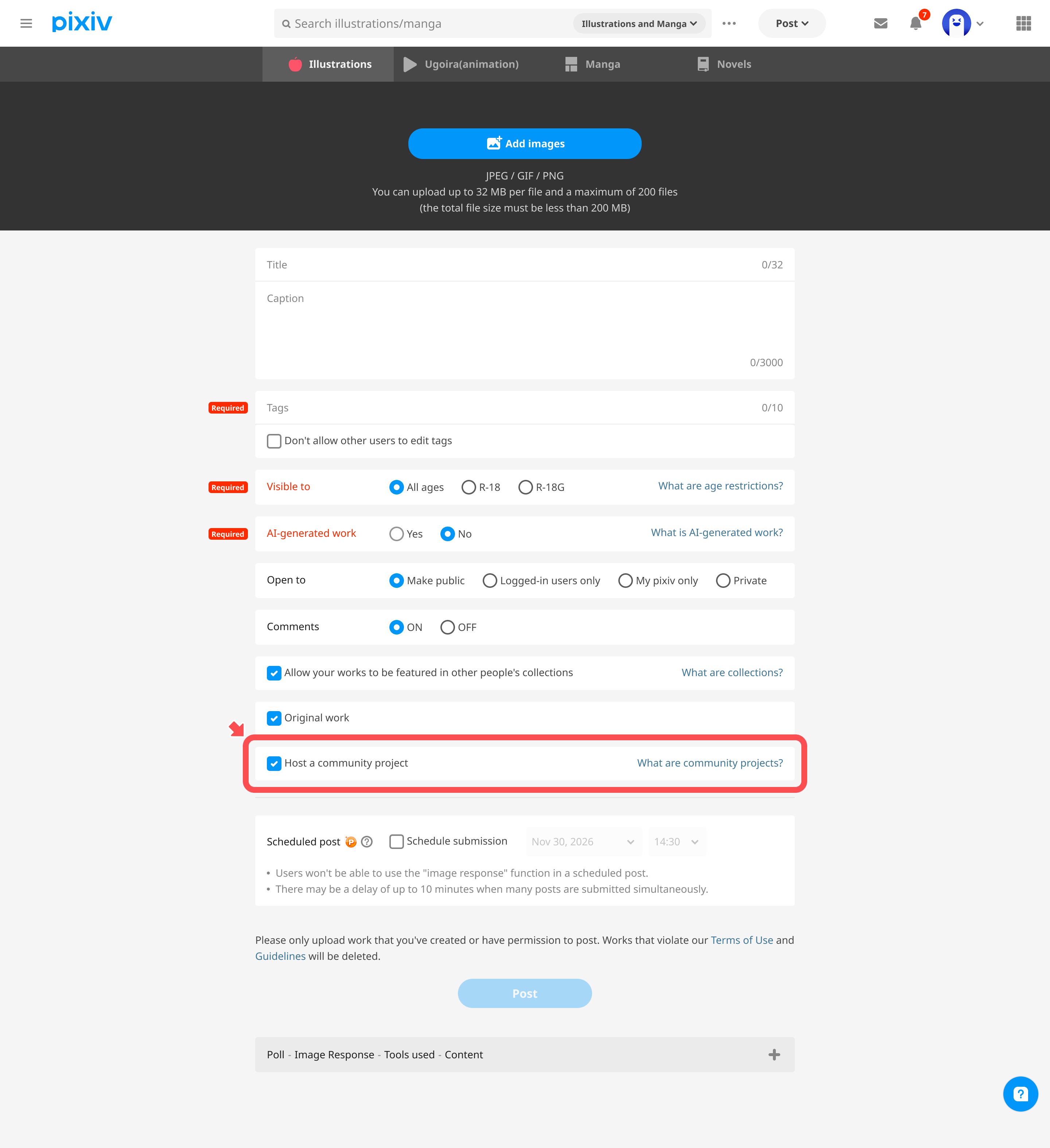
Before: Add the 企画目録 tag to your posted work
After: Check "Host a community project" on the posting or editing page for your work
Why we're making this change
This change is designed to make it easier for everyone to find projects where they can create and connect with others.
Previously, works unrelated to Users’ projects sometimes appeared on the Users’ projects page, making it harder to find the projects people were looking for. By changing how projects are set up, we aim to address this issue.
Please note that this change doesn't restrict the use of the 企画目録 tag. You can continue to use it freely.
Works already tagged with 企画目録
When the feature is released, any works on which the original poster added the 企画目録 tag themselves will automatically be set as community projects, carrying over their existing setup (including scheduled posts). Any 企画目録 tags already added will also remain in place.
If you don't want a work to be listed on the Community Projects page, please go to its editing page after the feature is released and uncheck "Host a community project" yourself.
*Please note that once the feature is released, simply adding the 企画目録 tag will no longer set a work as a community project or list it on the Community Projects page.
Joining community projects
The way one joins community projects isn't changing.
Each project has its own participation method, rules, and entry period. As before, please check the project details posted by the host and follow the instructions given there to join.
*The new "Host a community project" setting is for hosts to use on the work introducing their project. Do not check it on works you are submitting as entries.
Community Projects Guidelines
To help everyone enjoy projects with peace of mind, we've created the Community Projects Guidelines, which define what a community project is and set out the conditions for being listed.
If you host a community project after the feature is released, please review the Guidelines below.
Thank you for your continued support of pixiv.